In this tutorial, you’ll build a solver-judge workflow — a multi-agent system where several solver agents generate candidate solutions in parallel, and a judge agent evaluates them to select the best one. Then you’ll train the entire system end-to-end so that both the solvers and the judge improve over time.
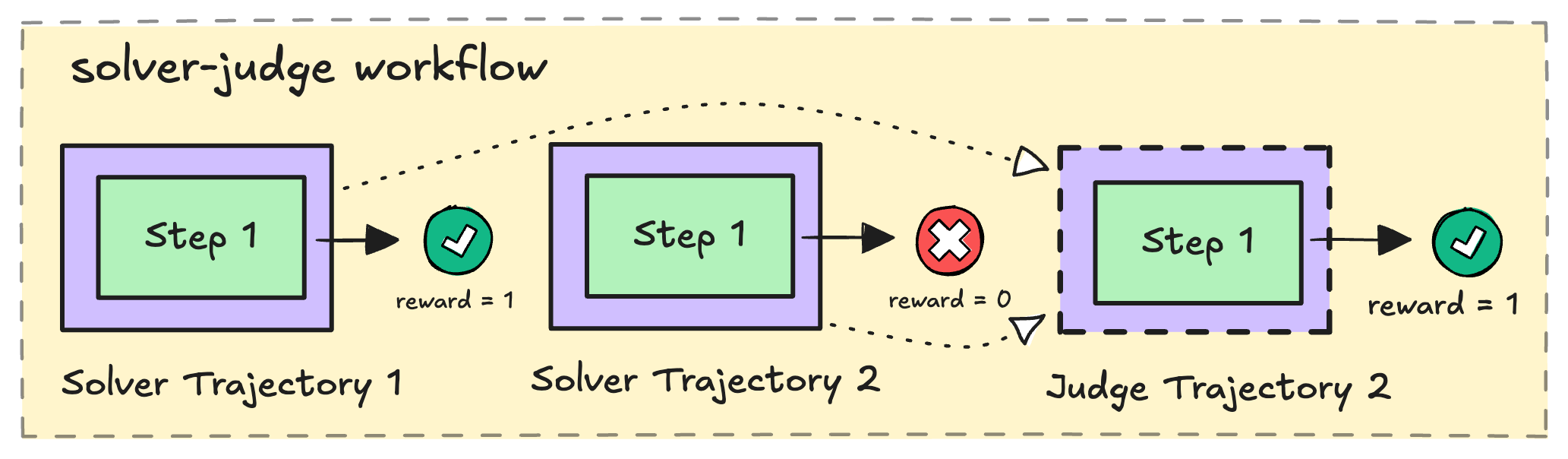
An illustration of a solver-judge workflow
By the end, you’ll have a working workflow, a training script, and a launch command ready to go.
The solver-judge pattern is a classic approach to test-time scaling — pairing a generator with a verifier lets the model self-improve by learning both to produce better solutions and to recognize correct ones.

Prerequisites

  • rLLM installed to the newest version (see this guide)
  • Basic familiarity with Python asyncio programming
  • Having a Tinker API key (we use Tinker as the backend for this tutorial), and export TINKER_API_KEY=<your_api_key> set in your environment

How the solver-judge workflow works

Here’s the high-level flow for a single task/prompt:
  1. SolveN solver agents each receive the problem and generate a candidate solution in parallel. Below we take N=2 for simplicity.
  2. Judge — A judge agent reviews all candidate solutions and selects the best one.
  3. Reward — Each solver receives a reward based on whether its solution is correct. The judge receives a reward based on whether it selected a correct answer.
  4. Return — The workflow packages everything into an Episode that the trainer uses to update the policy.
During training, this runs for K rollouts per task, producing K x N solver trajectories and K judge trajectories — giving the RL algorithm plenty of signal to learn from.

A quick look at rLLM’s data model

Before we start coding, let’s meet the three data structures you’ll be constructing in this tutorial. Think of them as nested containers — each one wraps the level below it.

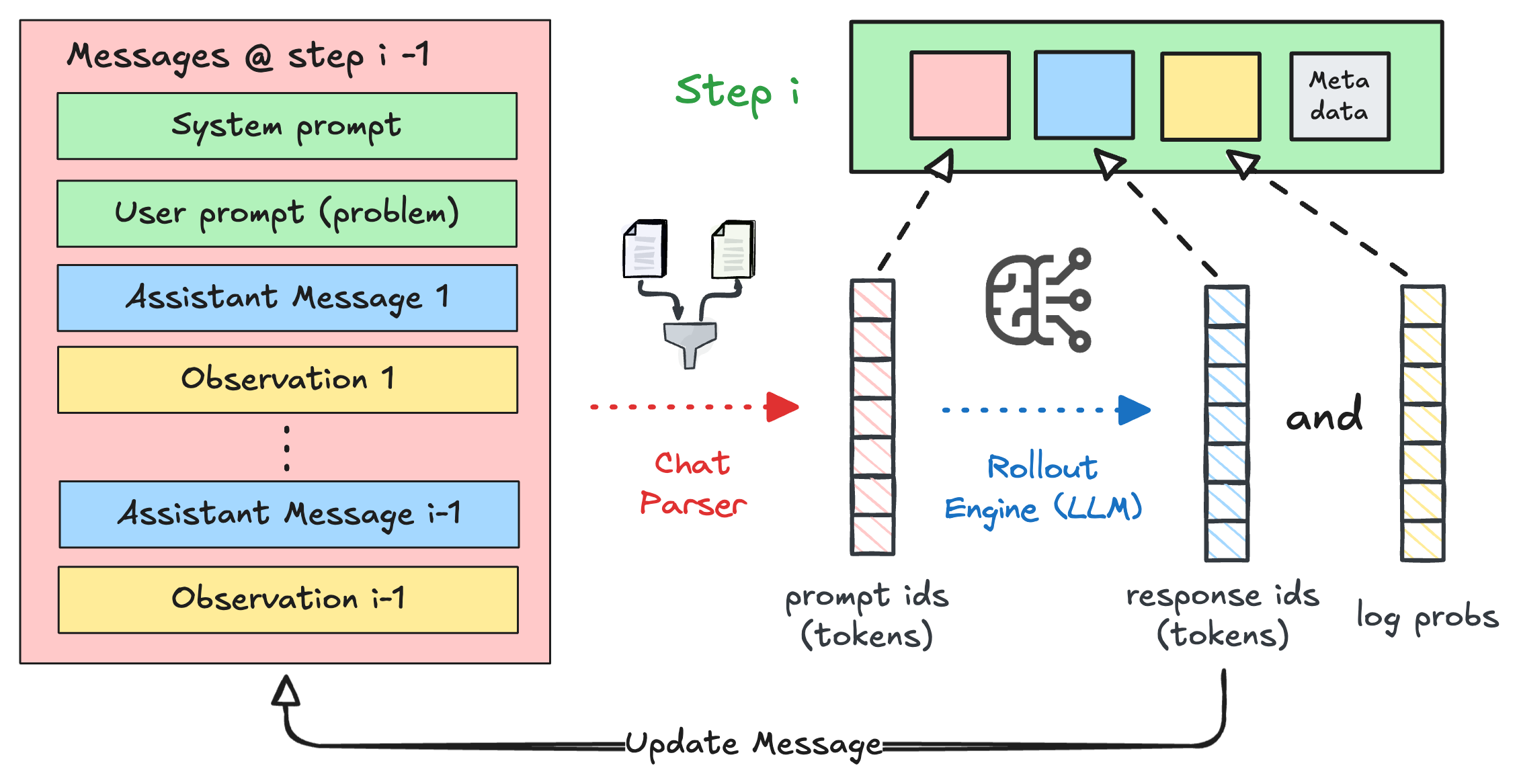
Step — one model interaction

A Step is the atomic unit: one call to the LLM. It captures the input tokens, the generated output tokens, and the log-probabilities needed for training. At runtime, it also carries higher-level context like chat messages, the model’s reasoning, and the parsed action.
Step: messages are parsed into prompt tokens, sent through the rollout engine, producing response tokens and log probabilities

Trajectory — a role’s journey through the workflow

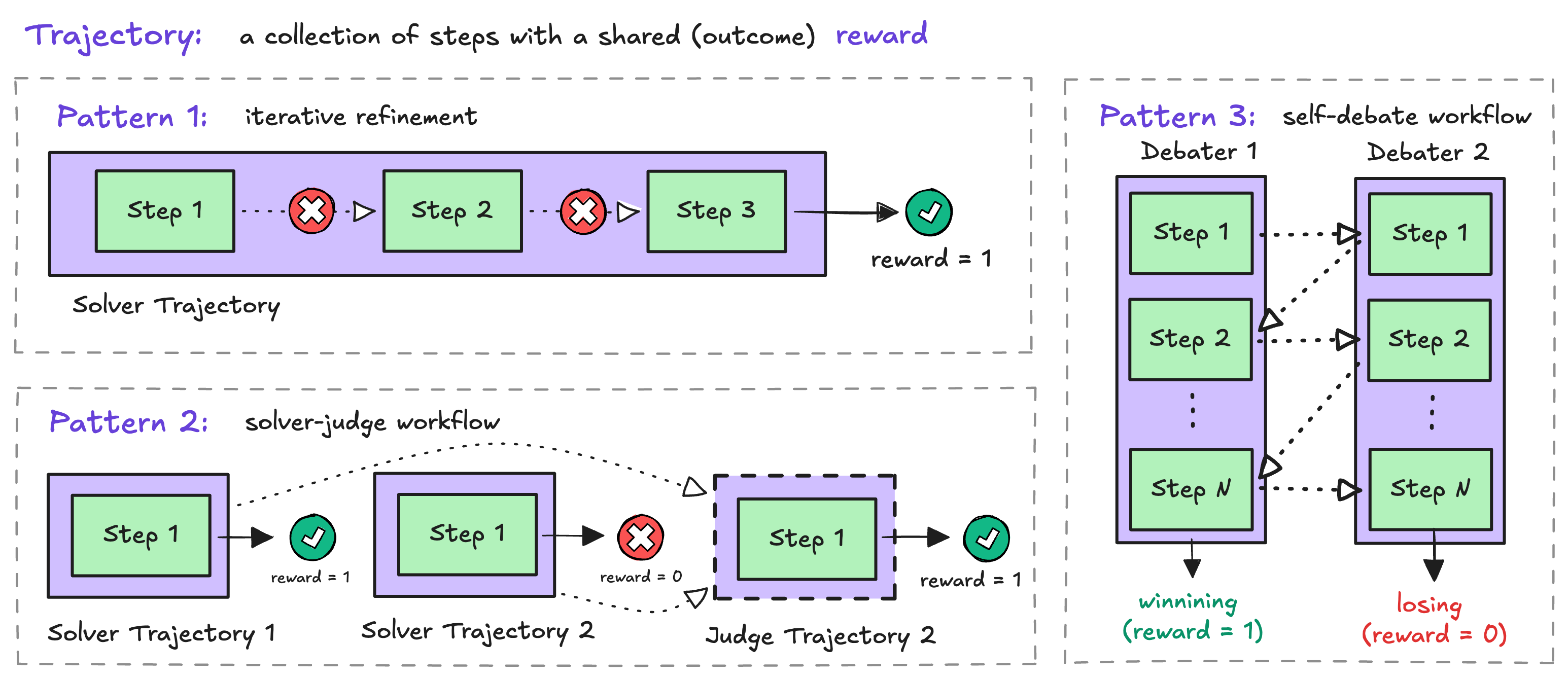
A Trajectory is an ordered list of Steps from a single role — for example, one solver’s attempt or the judge’s evaluation. Each trajectory has a name (like "solver" or "judge") that tells the trainer which trajectories to group together, and a shared outcome reward.
Trajectory patterns: iterative refinement, solver-judge, and self-debate workflows
Notice Pattern 2 in the diagram — that’s exactly what we’re building. Each solver produces its own trajectory, and the judge produces one more. Correct solvers get reward = 1, incorrect ones get reward = 0, and the judge’s reward depends on whether it picked a correct answer.

Episode — the full picture from one rollout

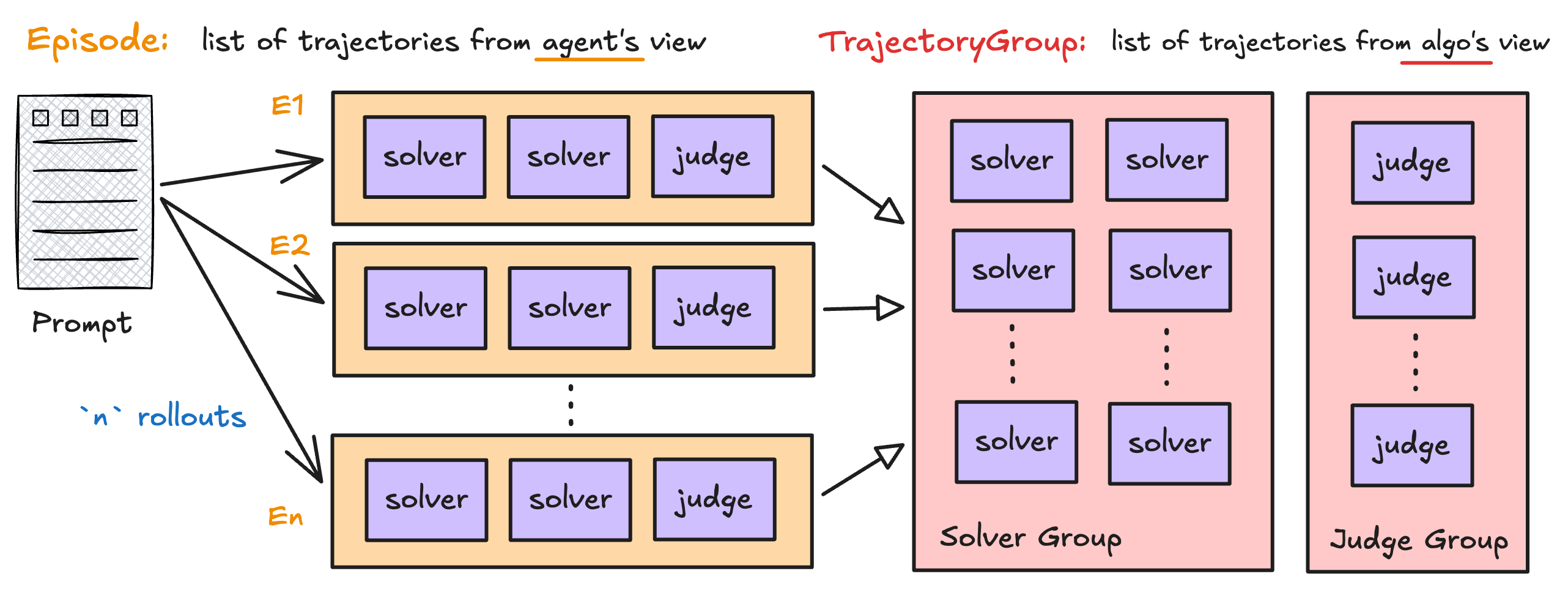
An Episode is what your Workflow.run() method returns. It bundles all the trajectories from a single rollout execution, along with metadata like is_correct and custom metrics.
Episode contains trajectories from the agent's view; TrajectoryGroup reorganizes them from the algorithm's view
The left side of the diagram shows the workflow view — each episode contains its solver and judge trajectories. The right side shows the algorithm view — during training, rLLM automatically regroups trajectories by name across rollouts (e.g., all solver trajectories for the same task go into one group). You don’t need to manage this yourself.
We’ll see each of these structures come to life as we build the workflow below.

Building the workflow

1

Define the Solver

The Solver takes a RolloutEngine and uses it to generate solutions. Each call to generate_solution makes one LLM call and wraps the result in a Trajectory.
import asyncio
import re

from rllm.agents.agent import Step, Trajectory
from rllm.engine import ModelOutput, RolloutEngine


class Solver:
    def __init__(self, rollout_engine: RolloutEngine, **kwargs):
        self.rollout_engine = rollout_engine

    async def generate_solution(self, problem: str) -> Trajectory:
        messages = [
            {"role": "user", "content": f"{problem}. Output the final answer within <answer>...</answer>"}
        ]
        output: ModelOutput = await self.rollout_engine.get_model_response(messages)
        return Trajectory(
            name="solver",
            steps=[
                Step(
                    chat_completions=messages + [
                        {"role": "assistant", "content": output.content, "reasoning": output.reasoning}
                    ],
                    thought=output.reasoning,
                    action=self._parse_solver_response(output.content),
                    model_output=output,
                )
            ],
        )

    async def generate_solutions(self, problem: str, n_solutions: int = 2) -> list[Trajectory]:
        tasks = [asyncio.create_task(self.generate_solution(problem)) for _ in range(n_solutions)]
        return await asyncio.gather(*tasks)

    def _parse_solver_response(self, response: str) -> str:
        answer_match = re.search(r"<answer>(.*?)</answer>", response, re.IGNORECASE | re.DOTALL)
        if answer_match:
            return f"<answer>{answer_match.group(1).strip()}</answer>"
        return "No solution found"
A few things to notice:
  • The trajectory is named "solver" — this name is how rLLM groups trajectories during training.
  • The Step captures the full chat history (chat_completions), the model’s reasoning (thought), the parsed answer (action), and the raw model output for token-level training data.
  • generate_solutions launches N solvers concurrently with asyncio.gather, so they run in parallel.
2

Define the Judge

The Judge receives the problem and all candidate solutions, then selects the best one.
class Judge:
    def __init__(self, rollout_engine: RolloutEngine, **kwargs):
        self.rollout_engine = rollout_engine

    async def judge_solutions(self, problem: str, solutions: list[str]) -> Trajectory:
        messages = [{"role": "user", "content": self._create_judge_prompt(problem, solutions)}]
        output: ModelOutput = await self.rollout_engine.get_model_response(messages)
        return Trajectory(
            name="judge",
            steps=[
                Step(
                    chat_completions=messages + [
                        {"role": "assistant", "content": output.content, "reasoning": output.reasoning}
                    ],
                    thought=output.reasoning,
                    action=self._parse_judge_response(output.content, solutions),
                    model_output=output,
                )
            ],
        )

    def _parse_judge_response(self, response: str, solutions: list[str]) -> str:
        answer_match = re.search(r"<answer>(.*?)</answer>", response, re.IGNORECASE | re.DOTALL)
        if answer_match:
            try:
                solution_index = int(answer_match.group(1).strip())
                return solutions[solution_index - 1]
            except (ValueError, IndexError):
                return ""
        return ""

    def _create_judge_prompt(self, problem: str, solutions: list[str]) -> str:
        prompt = f"""You are an expert verifier. Given a countdown problem and multiple solution attempts, select a correct solution.
Problem:
{problem}
Solutions to evaluate:
"""
        for i, solution in enumerate(solutions, 1):
            prompt += f"\nSolution {i}:\n{solution}\n"

        prompt += """
A correct solution must satisfy the following criteria:
1. The solution uses only the given numbers.
2. Each number is used exactly once.
3. Only basic arithmetic operations (+, -, *, /) are used.
4. The calculation results in the target number.
5. The final answer is clearly marked within <answer>...</answer> tags.
Output the index of your selected solution within <answer>...</answer> tags, e.g., <answer>1</answer> for the first solution."""
        return prompt
Same pattern as the solver — one LLM call, one Step, one Trajectory — but named "judge" instead. The judge’s action is the selected solution’s content (resolved from the index the model outputs), which makes it easy to evaluate with the same reward function used for solvers.
3

Compose the workflow

Now we wire the solver and judge together in a Workflow subclass. The run() method is where the magic happens.
from rllm.agents.agent import Episode
from rllm.rewards.reward_fn import RewardFunction
from rllm.workflows.workflow import Workflow


class SolverJudgeWorkflow(Workflow):
    def __init__(self, rollout_engine: RolloutEngine, n_solutions: int = 2,
                 reward_function: RewardFunction = None, **kwargs):
        super().__init__(rollout_engine, **kwargs)
        self.n_solutions = n_solutions
        self.reward_function = reward_function
        self.solver = Solver(rollout_engine)
        self.judge = Judge(rollout_engine)

    async def run(self, task: dict, uid: str, **kwargs) -> Episode:
        self.reset(task, uid)
        problem = task["question"]

        # 1. Solvers generate solutions in parallel
        solver_trajectories = await self.solver.generate_solutions(problem, self.n_solutions)

        # 2. Evaluate each solver's answer and assign rewards
        solutions = []
        for traj in solver_trajectories:
            solution = traj.steps[0].action
            solutions.append(solution)
            reward = self.reward_function(task, solution).reward
            traj.steps[0].reward = reward

        # 3. Judge picks the best solution
        judge_trajectory = await self.judge.judge_solutions(problem, solutions)
        selected_solution = judge_trajectory.steps[0].action

        # 4. Evaluate the judge's selection
        reward_result = self.reward_function(task, selected_solution)
        judge_trajectory.steps[0].reward = reward_result.reward
        is_correct = reward_result.is_correct

        # 5. Compute metrics
        solver_acc = sum(t.steps[0].reward for t in solver_trajectories) / len(solver_trajectories)
        judge_acc = int(is_correct)

        # 6. Return the episode
        return Episode(
            id=uid,
            task=task,
            trajectories=[*solver_trajectories, judge_trajectory],
            is_correct=is_correct,
            metrics={"solver_acc": solver_acc, "judge_acc": judge_acc},
        )
Let’s walk through run():
  1. self.reset(task, uid) — Clears state from the previous task so this workflow instance can be reused.
  2. Generate solutions — The solver runs n_solutions LLM calls in parallel and returns a list of Trajectory objects.
  3. Assign solver rewards — Each solver trajectory gets a reward based on whether its parsed answer is correct. This is the per-step reward that drives solver training.
  4. Judge selects — The judge sees all candidate solutions and picks one. Its reward depends on whether the selected solution is correct.
  5. Compute metricssolver_acc (fraction of correct solvers) and judge_acc (1 if the judge picked correctly, 0 otherwise) are logged during training.
  6. Return the Episode — All trajectories are bundled together. rLLM takes it from here.
The Episode you return is the complete training signal for this task. rLLM handles the rest — grouping trajectories by name, computing advantages, and updating the policy.
4

Review the complete code

You can find the complete, runnable code on GitHub:

solver_judge_flow.py

Complete solver-judge workflow implementation
import asyncio
import re

from rllm.agents.agent import Episode, Step, Trajectory
from rllm.engine import ModelOutput, RolloutEngine
from rllm.rewards.reward_fn import RewardFunction
from rllm.workflows.workflow import Workflow


class Solver:
    def __init__(self, rollout_engine: RolloutEngine, **kwargs):
        self.rollout_engine = rollout_engine

    async def generate_solution(self, problem: str) -> Trajectory:
        messages = [
            {"role": "user", "content": f"{problem}. Output the final answer within <answer>...</answer>"}
        ]
        output: ModelOutput = await self.rollout_engine.get_model_response(messages)
        return Trajectory(
            name="solver",
            steps=[
                Step(
                    chat_completions=messages + [
                        {"role": "assistant", "content": output.content, "reasoning": output.reasoning}
                    ],
                    thought=output.reasoning,
                    action=self._parse_solver_response(output.content),
                    model_output=output,
                )
            ],
        )

    async def generate_solutions(self, problem: str, n_solutions: int = 2) -> list[Trajectory]:
        tasks = [asyncio.create_task(self.generate_solution(problem)) for _ in range(n_solutions)]
        return await asyncio.gather(*tasks)

    def _parse_solver_response(self, response: str) -> str:
        answer_match = re.search(r"<answer>(.*?)</answer>", response, re.IGNORECASE | re.DOTALL)
        if answer_match:
            return f"<answer>{answer_match.group(1).strip()}</answer>"
        return "No solution found"


class Judge:
    def __init__(self, rollout_engine: RolloutEngine, **kwargs):
        self.rollout_engine = rollout_engine

    async def judge_solutions(self, problem: str, solutions: list[str]) -> Trajectory:
        messages = [{"role": "user", "content": self._create_judge_prompt(problem, solutions)}]
        output: ModelOutput = await self.rollout_engine.get_model_response(messages)
        return Trajectory(
            name="judge",
            steps=[
                Step(
                    chat_completions=messages + [
                        {"role": "assistant", "content": output.content, "reasoning": output.reasoning}
                    ],
                    thought=output.reasoning,
                    action=self._parse_judge_response(output.content, solutions),
                    model_output=output,
                )
            ],
        )

    def _parse_judge_response(self, response: str, solutions: list[str]) -> str:
        answer_match = re.search(r"<answer>(.*?)</answer>", response, re.IGNORECASE | re.DOTALL)
        if answer_match:
            try:
                solution_index = int(answer_match.group(1).strip())
                return solutions[solution_index - 1]
            except (ValueError, IndexError):
                return ""
        return ""

    def _create_judge_prompt(self, problem: str, solutions: list[str]) -> str:
        prompt = f"""You are an expert verifier. Given a countdown problem and multiple solution attempts, select a correct solution.
Problem:
{problem}
Solutions to evaluate:
"""
        for i, solution in enumerate(solutions, 1):
            prompt += f"\nSolution {i}:\n{solution}\n"

        prompt += """
A correct solution must satisfy the following criteria:
1. The solution uses only the given numbers.
2. Each number is used exactly once.
3. Only basic arithmetic operations (+, -, *, /) are used.
4. The calculation results in the target number.
5. The final answer is clearly marked within <answer>...</answer> tags.
Output the index of your selected solution within <answer>...</answer> tags, e.g., <answer>1</answer> for the first solution."""
        return prompt


class SolverJudgeWorkflow(Workflow):
    def __init__(self, rollout_engine: RolloutEngine, n_solutions: int = 2,
                 reward_function: RewardFunction = None, **kwargs):
        super().__init__(rollout_engine, **kwargs)
        self.n_solutions = n_solutions
        self.reward_function = reward_function
        self.solver = Solver(rollout_engine)
        self.judge = Judge(rollout_engine)

    async def run(self, task: dict, uid: str, **kwargs) -> Episode:
        self.reset(task, uid)
        problem = task["question"]

        solver_trajectories = await self.solver.generate_solutions(problem, self.n_solutions)

        solutions = []
        for traj in solver_trajectories:
            solution = traj.steps[0].action
            solutions.append(solution)
            reward = self.reward_function(task, solution).reward
            traj.steps[0].reward = reward

        judge_trajectory = await self.judge.judge_solutions(problem, solutions)
        selected_solution = judge_trajectory.steps[0].action

        reward_result = self.reward_function(task, selected_solution)
        judge_trajectory.steps[0].reward = reward_result.reward
        is_correct = reward_result.is_correct

        solver_acc = sum(t.steps[0].reward for t in solver_trajectories) / len(solver_trajectories)
        judge_acc = int(is_correct)

        return Episode(
            id=uid,
            task=task,
            trajectories=[*solver_trajectories, judge_trajectory],
            is_correct=is_correct,
            metrics={"solver_acc": solver_acc, "judge_acc": judge_acc},
        )

Training the workflow

With the workflow defined, you need two more pieces: a Python training script that wires everything together, and a shell script that launches training with the right configuration.

Writing the training script

The simplest way to train a workflow is through AgentTrainer, which wraps the UnifiedTrainer and handles backend setup for you.
import hydra

from examples.solver_judge.solver_judge_flow import SolverJudgeWorkflow
from rllm.data.dataset import DatasetRegistry
from rllm.experimental.common.config import rLLMAdvantageEstimator
from rllm.experimental.unified_trainer import AgentTrainer
from rllm.rewards.countdown_reward import countdown_reward_fn


@hydra.main(config_path="pkg://rllm.experimental.config", config_name="unified", version_base=None)
def main(config):
    train_dataset = DatasetRegistry.load_dataset("countdown", "train")
    test_dataset = DatasetRegistry.load_dataset("countdown", "test")

    traj_group_adv_estimator_map = {
        "solver": rLLMAdvantageEstimator.GRPO,
        "judge": rLLMAdvantageEstimator.REINFORCE,
    }

    trainer = AgentTrainer(
        workflow_class=SolverJudgeWorkflow,
        workflow_args={
            "n_solutions": 2,
            "reward_function": countdown_reward_fn,
        },
        config=config,
        train_dataset=train_dataset,
        val_dataset=test_dataset,
        backend="tinker",
        traj_group_adv_estimator_map=traj_group_adv_estimator_map,
    )
    trainer.train()


if __name__ == "__main__":
    main()
Here’s what each piece does:
  • DatasetRegistry.load_dataset — Loads a built-in dataset. The countdown task asks the model to combine numbers with arithmetic to reach a target — a good testbed for reasoning.
  • workflow_class + workflow_args — Tells the trainer which workflow to run and how to configure it. These args are passed to every workflow instance.
  • backend="tinker" — Selects the Tinker backend for async training. Other options include "verl".
  • traj_group_adv_estimator_map — This is the key to multi-role training. It assigns a different advantage estimator to each trajectory group by name.
Why different estimators? During each rollout, there are N solver trajectories but only 1 judge trajectory. GRPO works well for solvers because it compares multiple trajectories against each other within a group. The judge, with only one trajectory per rollout, benefits from REINFORCE instead. See advantage estimator for details.

Full training script on GitHub

Complete training script with AgentTrainer and per-role estimators

Writing the launch script

The training script uses Hydra for configuration, so you pass config overrides on the command line. A shell script keeps this manageable.
#!/bin/bash
set -x

# Environment setup for vLLM
export VLLM_ATTENTION_BACKEND=FLASH_ATTN
export VLLM_USE_V1=1
export CUDA_VISIBLE_DEVICES=0,1,2,3,4,5,6,7

python3 -m examples.solver_judge.train_solver_judge_flow \
    # -- Data --
    data.train_batch_size=64 \
    data.max_prompt_length=2048 \
    data.max_response_length=1024 \
    # -- Model --
    actor_rollout_ref.model.path=Qwen/Qwen3-4B-Instruct-2507 \
    actor_rollout_ref.actor.optim.lr=1e-6 \
    # -- Rollout --
    actor_rollout_ref.rollout.n=4 \
    actor_rollout_ref.rollout.temperature=1.0 \
    actor_rollout_ref.rollout.gpu_memory_utilization=0.8 \
    # -- Algorithm --
    algorithm.adv_estimator=grpo \
    # -- Workflow --
    rllm.workflow.use_workflow=True \
    # -- Training --
    trainer.total_epochs=100 \
    trainer.test_freq=10 \
    trainer.save_freq=1000 \
    trainer.logger=['console','wandb'] \
    trainer.project_name='solver-judge-workflow' \
    trainer.experiment_name='countdown-solver-judge'
Key configuration groups:
GroupParametersWhat they control
Datatrain_batch_size, max_prompt_length, max_response_lengthHow many tasks per batch and token length limits
Modelmodel.path, actor.optim.lrWhich model to train and the learning rate
Rolloutrollout.n, rollout.temperatureNumber of rollouts per task (K) and sampling temperature
Algorithmadv_estimatorDefault advantage estimator (overridden per-role by traj_group_adv_estimator_map)
Workflowworkflow.use_workflowMust be True to enable the workflow engine
Trainingtotal_epochs, test_freq, save_freqTraining duration and checkpoint/eval frequency
The environment variables configure vLLM (the inference engine used during rollouts). CUDA_VISIBLE_DEVICES controls which GPUs are used. Adjust these based on your hardware setup.
Run training with:
bash train_solver_judge_flow.sh
For the full launch script with all available config overrides, see the example on GitHub.

What happens during training

With your workflow and training script in place, here’s what the training loop does under the hood — tying back to the data model we introduced earlier. For each batch of tasks:
  1. Generate episodes — The engine runs your SolverJudgeWorkflow.run() K times per task (controlled by rollout.n). Each run produces one Episode containing N solver trajectories + 1 judge trajectory.
  2. Group trajectories — Episodes are regrouped into TrajectoryGroups by name. All solver trajectories for the same task end up in one group; all judge trajectories in another. This is the right side of the episode diagram:
Episodes are transformed into TrajectoryGroups by regrouping trajectories by name
  1. Compute advantages — Within each group, the advantage estimator compares trajectories. Solvers are compared via GRPO (relative ranking within the group), while judge trajectories use REINFORCE.
  2. Update the policy — The shared model is updated to increase the probability of high-advantage trajectories and decrease low-advantage ones.
  3. Validate — Periodically, the engine runs validation rollouts (without training) and reports solver_acc and judge_acc metrics.
For the full details on the training pipeline, see unified trainer.

Next steps