

- Session isolation — each session runs in a separate microVM, providing strong security isolation between concurrent rollouts
- Auto-scaling — new runtime sessions spin up instantly on demand, enabling massive parallel rollouts without contending for local CPU resources
- Sandboxed execution — each session runs in a secure microVM with resource controls, so agents can safely execute tools (code, shell commands, API calls). Sessions can run for up to 8 hours
- Decoupled dependencies — your agent runs in its own container with its own dependencies, completely separate from the training library
Architecture
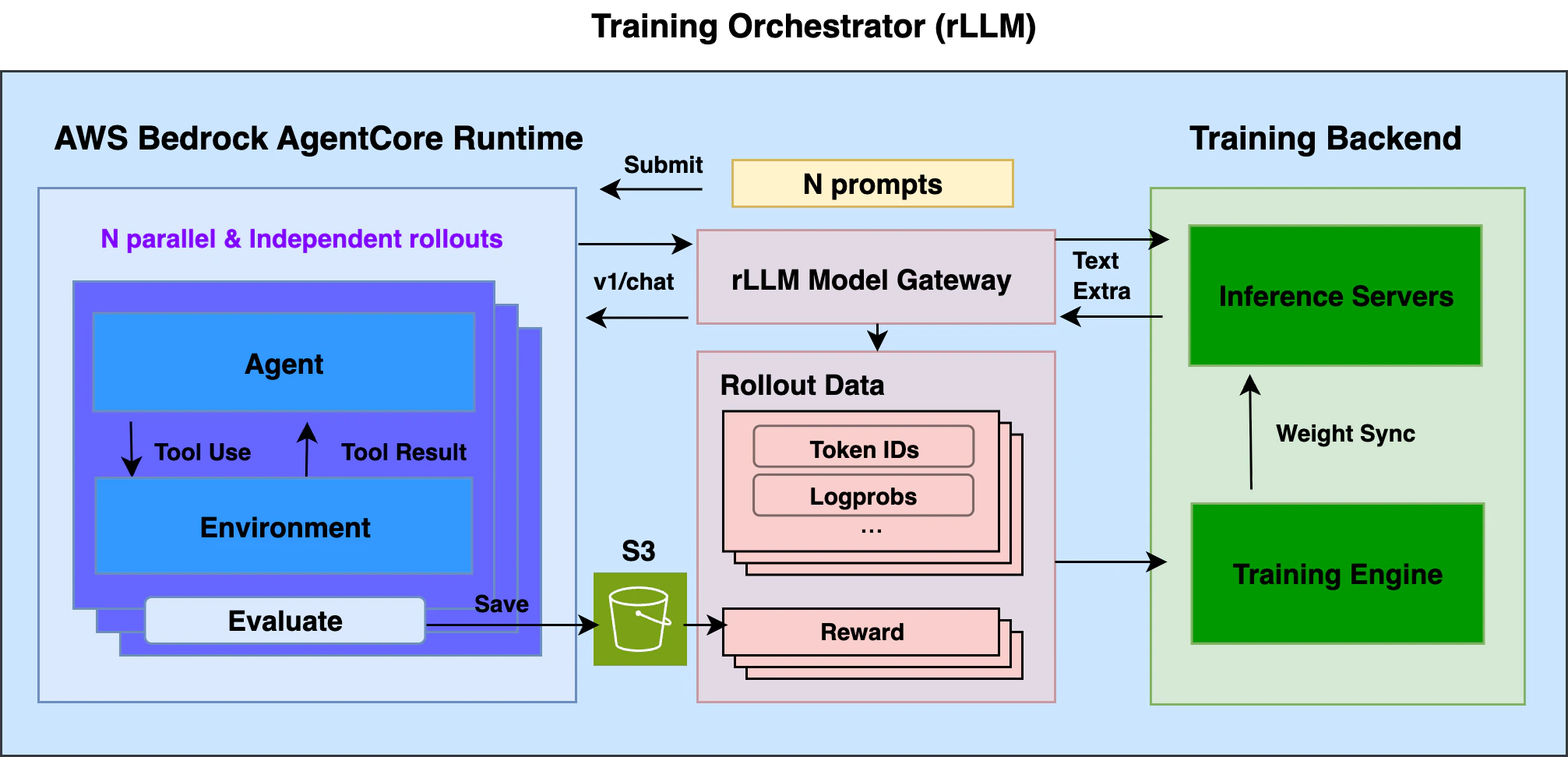
- AWS Bedrock AgentCore Runtime (ACR) — Serverless runtime for deploying agents with auto-scaling and session isolation. Hosted agents call the standard OpenAI chat completions API.
- rllm-model-gateway — HTTP proxy that requests and intercepts training-related data such as token IDs and logprobs from inference servers, and groups them under corresponding sessions.
Prerequisites
- rLLM installed with a training backend
- AWS account with ACR access, an ECR repository, and an S3 bucket
- AWS credentials configured (
aws configurewith permissions for Bedrock AgentCore, ECR, and S3)
Setup
1
Install the AgentCore extra
From the rLLM repo root, install the AgentCore integration package. This adds the ART dependency for easily communicating with ACR from the training side.
2
Build your agent
Your agent runs as a container on ACR. It receives prompts, calls the model via a standard OpenAI-compatible API (through
rllm-model-gateway during training), executes tools, computes a reward, and returns it. See agentcore-rl-toolkit for how to build an agent from scratch or adapt a production agent for RL training.Math agent (rl_app.py):Trajectory capture is handled automatically by
rllm-model-gateway — a transparent HTTP proxy between your agent and the inference server during training. It captures token IDs, logprobs, etc. at each turn without any changes to the agent code; rLLM manages the gateway during training.3
Deploy to ACR
Follow the deployment instructions in the agentcore-rl-toolkit repo:
- Prepare a Dockerfile
- Build and push the container image to ECR
- Create an ACR runtime
AGENTCORE_AGENT_ARN— the ARN of your deployed agent runtime (e.g.,arn:aws:bedrock-agentcore:us-west-2:123456789012:runtime/my-agent)AGENTCORE_S3_BUCKET— the S3 bucket for storing rollout results
4
Prepare data and configure
Prepare the dataset from the rLLM repo root:This downloads GSM8K from HuggingFace and registers it as
gsm8k_agentcore with {"prompt": ..., "answer": ...} fields matching what the agent expects.Create a .env file at the rLLM repo root:5
Run training
The AgentCore configuration is backend-agnostic. Key parameters:See the Tinker and verl backend pages for backend-specific configuration.
rllm.remote_runtime.enabled=true+backend=agentcore— enables ACR as the rollout runtimetps_limit=25— default ACR rate limit (transactions per second); adjustable in AWS accounts.session_timeout=300— 5-minute timeout per agent session; set it per agent use case.
- Tinker
- verl
What happens during training
- rLLM loads a batch of prompts from the dataset and submits them to ACR, each as a separate agent session
- ACR auto-scales containers. Each agent runs
rl_app.py, calling the model viabase_url(routed throughrllm-model-gateway) - The gateway captures token IDs, logprobs, routing replays, etc. from inference server responses
- Each agent computes a reward and returns
{"rewards": ...}. The@rollout_entrypointdecorator saves results to S3 - rLLM collects rewards from S3 and combines them with token data from the gateway to compute advantages and update the policy