Repository: rllm-org/rllm-ui
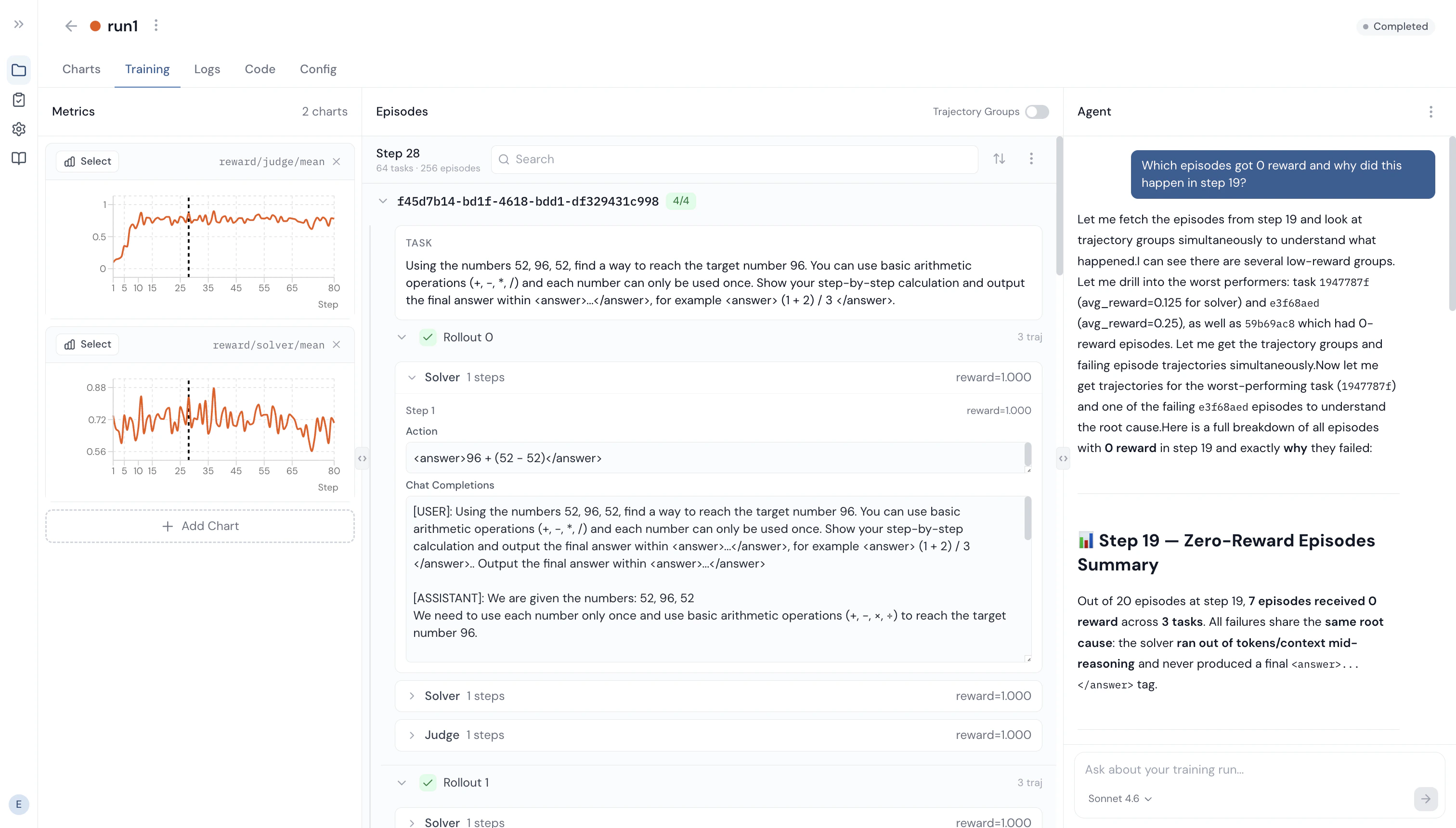
Web interface for monitoring and analyzing training runs in real time. Think of wandb dedicated to rLLM, with episode/trajectory search, an observability AI agent, and more. Only supports training runs using the unified trainer.

Features

  • Real-time dashboard — Live metrics charts with SSE streaming, multi-experiment overlay with custom colors
  • Episode and trajectory inspection — Browse/search episodes, inspect agent trajectories step-by-step (observations, actions, rewards), view in trajectory groups
  • Training logs — Live stdout/stderr capture with ANSI color support, search with match navigation
  • Code and config visibility — View extracted workflow/agent source code, Hydra config snapshots
  • Observability AI agent — Query your training data using natural language

Getting started

There are two ways to access rLLM UI:
  1. Cloud — Use the hosted service at ui.rllm-project.com. No setup required.
  2. Self-hosted — Run locally from the repository (see below).
Regardless of the service you use, add ui to your trainer’s logger list in your rLLM training script:
trainer.logger="['console','ui']"

How it works

rLLM connects to the UI via the UILogger backend, registered as "ui" in the Tracking class (rllm/utils/tracking.py). On init, the logger:
  1. Creates a training session via POST /api/sessions
  2. Starts a background heartbeat thread (for crash detection)
  3. Wraps stdout/stderr with TeeStream to capture training logs
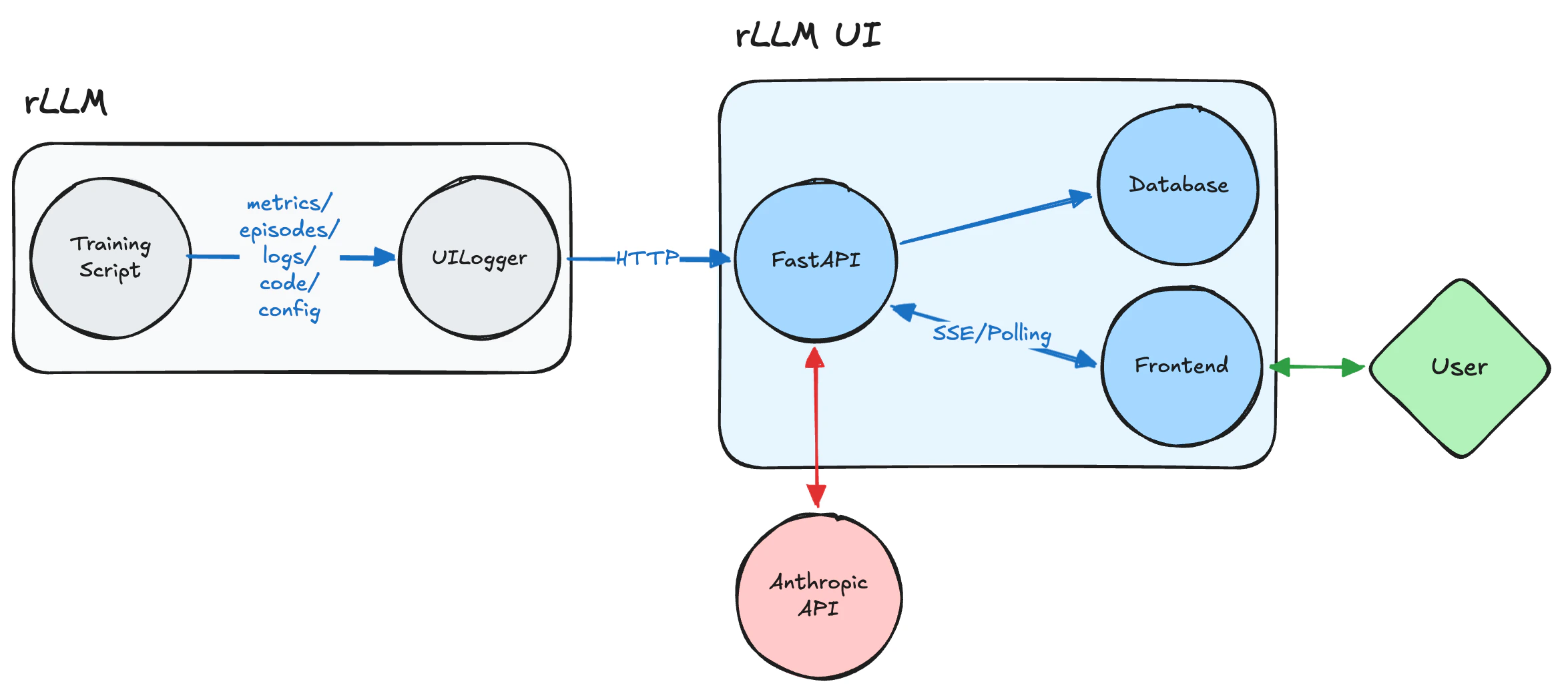
During training, the logger sends data over HTTP. The overall flow:
rLLM UI architecture diagram showing the data flow from training script through UILogger to the UI frontend

Cloud setup

1

Sign up

2

Copy your API key

Copy your API key (shown once at registration)
3

Set the key in your training environment

Set the key either through export or in .env:
export RLLM_API_KEY="your-api-key"
Run your training script with 'ui' in the logger list, and you will see your training runs in real time.
VariableRequiredScopeDefaultDescription
RLLM_API_KEYYesTraining script envAPI key for authenticating training data ingestion (shown once at registration)
RLLM_UI_URLNoTraining script envhttps://ui.rllm-project.comDefaults to cloud URL when RLLM_API_KEY is set
The observability AI agent can be enabled from the Settings page in the UI by entering your ANTHROPIC_API_KEY there.

Self-hosted setup

git clone https://github.com/rllm-org/rllm-ui.git
cd rllm-ui

# Install dependencies
cd api && pip install -r requirements.txt
cd ../frontend && npm install

# Run (two terminals)
cd api && uvicorn main:app --reload --port 3000
cd frontend && npm run dev
Open http://localhost:5173 (or the port shown in the Vite output).
If you run the API on a port other than 3000, update both sides so they know where to find it:
  • rLLM training sideexport RLLM_UI_URL="http://localhost:<port>"
  • rllm-ui frontend — set VITE_API_URL=http://localhost:<port> in frontend/.env.development

Database

rLLM UI stores sessions, metrics, episodes, trajectories, and logs in a database so they persist across restarts and are searchable.
  • SQLite (default) — No setup required. A local file (api/rllm_ui.db) is created on first run.
  • PostgreSQL — Adds full-text search with stemming and relevance ranking. Set DATABASE_URL in api/.env:
DATABASE_URL="postgresql://user:pass@localhost:5432/rllm"

Observability AI agent

rLLM UI includes a built-in AI agent that can query your training data using natural language. Currently experimental. To enable it, set your Anthropic API key in api/.env:
ANTHROPIC_API_KEY="sk-ant-..."

Configuration

VariableRequiredScopeDefaultDescription
RLLM_UI_URLNoTraining script envhttp://localhost:3000URL of your local rllm-ui server
DATABASE_URLNoapi/.envSQLitePostgreSQL connection string. Defaults to SQLite if unset.
ANTHROPIC_API_KEYNoapi/.envEnables the built-in AI agent
VITE_API_URLNofrontend/.env.developmenthttp://localhost:3000Only needed if the API runs on a non-default port