> ## Documentation Index
> Fetch the complete documentation index at: https://docs.rllm-project.com/llms.txt
> Use this file to discover all available pages before exploring further.
# AWS Bedrock AgentCore
> Train agents using AWS Bedrock AgentCore Runtime for secure, massively parallel rollouts without managing any infra.
[AWS Bedrock AgentCore Runtime (ACR)](https://docs.aws.amazon.com/bedrock-agentcore/latest/devguide/agents-tools-runtime.html) is AWS's serverless runtime for deploying LLM agents. Key properties that make it well-suited for online RL rollouts:
* **Session isolation** — each session runs in a separate microVM, providing strong security isolation between concurrent rollouts
* **Auto-scaling** — new runtime sessions spin up instantly on demand, enabling massive parallel rollouts without contending for local CPU resources
* **Sandboxed execution** — each session runs in a secure microVM with resource controls, so agents can safely execute tools (code, shell commands, API calls). Sessions can run for up to 8 hours
* **Decoupled dependencies** — your agent runs in its own container with its own dependencies, completely separate from the training library
ACR handles the infrastructure complexity while you focus on agent logic and reward design. After training, you can deploy your fine-tuned model on the same ACR stack with minimal code changes.
Use [agentcore-rl-toolkit (ART)](https://github.com/awslabs/agentcore-rl-toolkit) to build agents that conform to the ACR HTTP contract and are compatible with rLLM. See the [example agents](https://github.com/awslabs/agentcore-rl-toolkit/tree/main/examples) for complete implementations.
This guide uses a GSM8K math agent as a running example. Training any other agent only requires changing the agent ARN in the config.
## Architecture
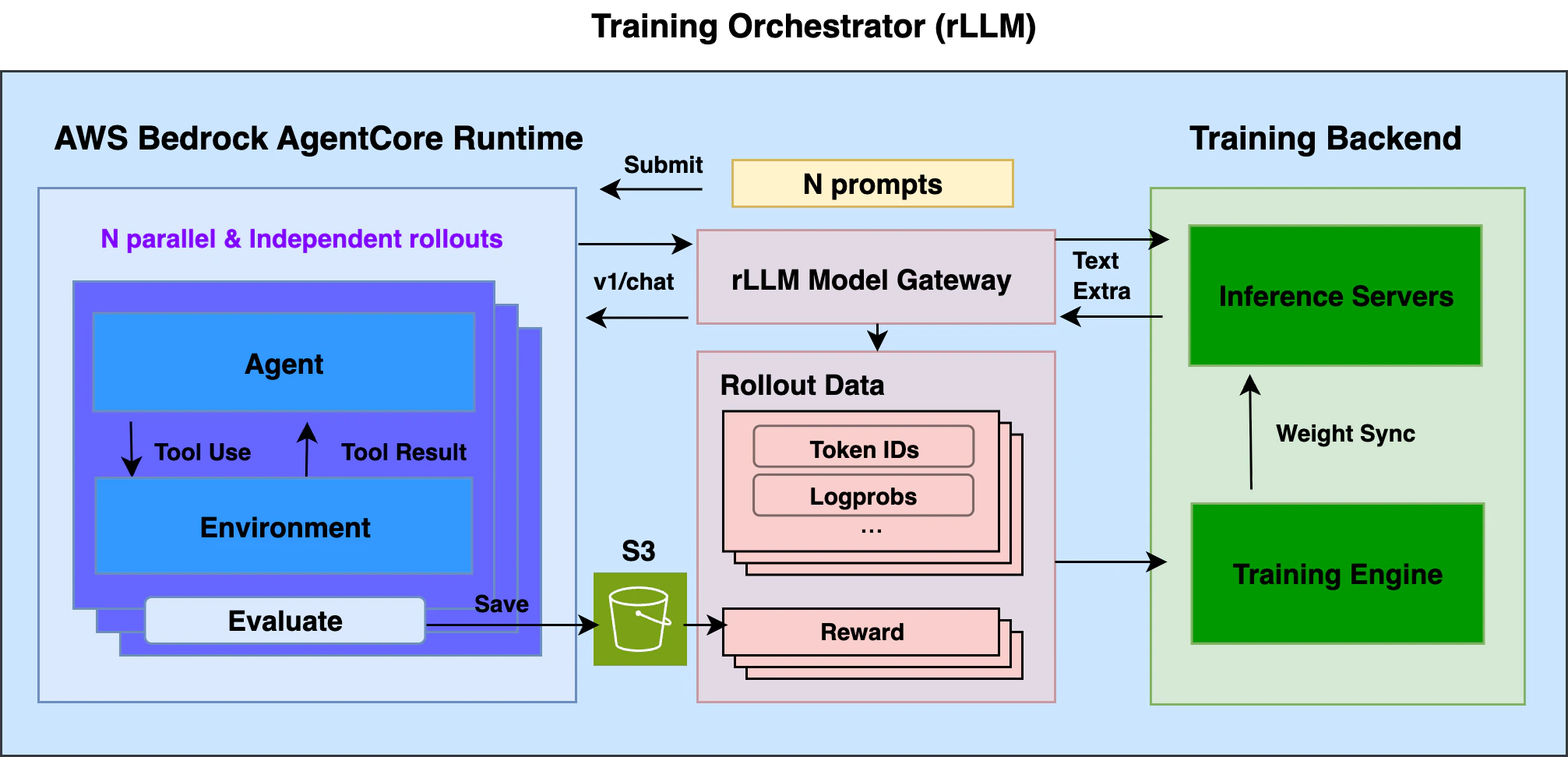 **Components:**
* **[AWS Bedrock AgentCore Runtime (ACR)](https://docs.aws.amazon.com/bedrock-agentcore/latest/devguide/agents-tools-runtime.html)** — Serverless runtime for deploying agents with auto-scaling and session isolation. Hosted agents call the standard OpenAI chat completions API.
* **[rllm-model-gateway](https://github.com/rllm-org/rllm/tree/main/rllm-model-gateway)** — HTTP proxy that requests and intercepts training-related data such as token IDs and logprobs from inference servers, and groups them under corresponding sessions.
## Prerequisites
* rLLM installed with a training backend
* AWS account with ACR access, an ECR repository, and an S3 bucket
* AWS credentials configured (`aws configure` with permissions for Bedrock AgentCore, ECR, and S3)
## Setup
From the rLLM repo root, install the AgentCore integration package. This adds the ART dependency for easily communicating with ACR from the training side.
```bash theme={null}
uv pip install -e ".[agentcore]"
```
Your agent runs as a container on ACR. It receives prompts, calls the model via a standard OpenAI-compatible API (through `rllm-model-gateway` during training), executes tools, computes a reward, and returns it. See [agentcore-rl-toolkit](https://github.com/awslabs/agentcore-rl-toolkit) for how to build an agent from scratch or adapt a production agent for RL training.
**Math agent ([`rl_app.py`](https://github.com/awslabs/agentcore-rl-toolkit/blob/main/examples/strands_math_agent/rl_app.py)):**
```python theme={null}
from reward import GSM8KReward
from strands import Agent
from strands.models.openai import OpenAIModel
from strands_tools import calculator
from agentcore_rl_toolkit import AgentCoreRLApp
app = AgentCoreRLApp()
system_prompt = (
"Your task is to solve the math problem. "
+ "Use the calculator tool to compute all mathematical expressions. "
+ 'Let\'s think step by step and output the final answer after "####".'
)
reward_fn = GSM8KReward()
@app.rollout_entrypoint
def invoke_agent(payload: dict):
base_url = payload["_rollout"]["base_url"]
model_id = payload["_rollout"]["model_id"]
params = payload["_rollout"].get("sampling_params", {})
model = OpenAIModel(
client_args={"api_key": "EMPTY", "base_url": base_url},
model_id=model_id,
params=params,
)
agent = Agent(
model=model,
tools=[calculator],
system_prompt=system_prompt,
)
user_input = payload.get("prompt")
answer = payload.get("answer")
response = agent(user_input)
rewards = reward_fn(
response_text=response.message["content"][0]["text"],
ground_truth=answer,
)
return {"rewards": rewards}
if __name__ == "__main__":
app.run()
```
**Trajectory capture** is handled automatically by `rllm-model-gateway` — a transparent HTTP proxy between your agent and the inference server during training. It captures token IDs, logprobs, etc. at each turn without any changes to the agent code; rLLM manages the gateway during training.
Follow the deployment instructions in the [agentcore-rl-toolkit](https://github.com/awslabs/agentcore-rl-toolkit) repo:
1. Prepare a Dockerfile
2. Build and push the container image to ECR
3. Create an ACR runtime
After deployment, note two values you'll need for training:
* **`AGENTCORE_AGENT_ARN`** — the ARN of your deployed agent runtime (e.g., `arn:aws:bedrock-agentcore:us-west-2:123456789012:runtime/my-agent`)
* **`AGENTCORE_S3_BUCKET`** — the S3 bucket for storing rollout results
**Prepare the dataset** from the rLLM repo root:
```bash theme={null}
uv run python -m examples.agentcore_math.prepare_gsm8k_data
```
This downloads GSM8K from HuggingFace and registers it as `gsm8k_agentcore` with `{"prompt": ..., "answer": ...}` fields matching what the agent expects.
**Create a `.env` file** at the rLLM repo root:
```bash theme={null}
AGENTCORE_AGENT_ARN=arn:aws:bedrock-agentcore:us-west-2:123456789012:runtime/your-agent
AGENTCORE_S3_BUCKET=your-s3-bucket
```
The AgentCore configuration is backend-agnostic. Key parameters:
* `rllm.remote_runtime.enabled=true` + `backend=agentcore` — enables ACR as the rollout runtime
* `tps_limit=25` — default ACR rate limit (transactions per second); adjustable in AWS accounts.
* `session_timeout=300` — 5-minute timeout per agent session; set it per agent use case.
```bash theme={null}
bash examples/agentcore_math/train_agentcore_math_tinker.sh
```
```bash theme={null}
bash examples/agentcore_math/train_agentcore_math_verl.sh
```
See the [Tinker](/backends/tinker) and [verl](/backends/verl) backend pages for backend-specific configuration.
## What happens during training
1. rLLM loads a batch of prompts from the dataset and submits them to ACR, each as a separate agent session
2. ACR auto-scales containers. Each agent runs `rl_app.py`, calling the model via `base_url` (routed through `rllm-model-gateway`)
3. The gateway captures token IDs, logprobs, routing replays, etc. from inference server responses
4. Each agent computes a reward and returns `{"rewards": ...}`. The `@rollout_entrypoint` decorator saves results to S3
5. rLLM collects rewards from S3 and combines them with token data from the gateway to compute advantages and update the policy
## Troubleshooting
| Issue | Fix |
| --------------------------------- | ------------------------------------------------------------------------------------------ |
| ACR sessions timing out | Increase `rllm.remote_runtime.session_timeout` (default 300s) |
| Rate limiting / throttling errors | ACR has a default 25 TPS limit. Ensure `tps_limit=25` is set. Reduce `tps_limit` if needed |
| Model not found errors in agent | Ensure the model path in your training config matches what the inference server is serving |
| S3 permission errors | The ACR execution role needs `s3:PutObject` and `s3:GetObject` on the configured bucket |
**Components:**
* **[AWS Bedrock AgentCore Runtime (ACR)](https://docs.aws.amazon.com/bedrock-agentcore/latest/devguide/agents-tools-runtime.html)** — Serverless runtime for deploying agents with auto-scaling and session isolation. Hosted agents call the standard OpenAI chat completions API.
* **[rllm-model-gateway](https://github.com/rllm-org/rllm/tree/main/rllm-model-gateway)** — HTTP proxy that requests and intercepts training-related data such as token IDs and logprobs from inference servers, and groups them under corresponding sessions.
## Prerequisites
* rLLM installed with a training backend
* AWS account with ACR access, an ECR repository, and an S3 bucket
* AWS credentials configured (`aws configure` with permissions for Bedrock AgentCore, ECR, and S3)
## Setup
From the rLLM repo root, install the AgentCore integration package. This adds the ART dependency for easily communicating with ACR from the training side.
```bash theme={null}
uv pip install -e ".[agentcore]"
```
Your agent runs as a container on ACR. It receives prompts, calls the model via a standard OpenAI-compatible API (through `rllm-model-gateway` during training), executes tools, computes a reward, and returns it. See [agentcore-rl-toolkit](https://github.com/awslabs/agentcore-rl-toolkit) for how to build an agent from scratch or adapt a production agent for RL training.
**Math agent ([`rl_app.py`](https://github.com/awslabs/agentcore-rl-toolkit/blob/main/examples/strands_math_agent/rl_app.py)):**
```python theme={null}
from reward import GSM8KReward
from strands import Agent
from strands.models.openai import OpenAIModel
from strands_tools import calculator
from agentcore_rl_toolkit import AgentCoreRLApp
app = AgentCoreRLApp()
system_prompt = (
"Your task is to solve the math problem. "
+ "Use the calculator tool to compute all mathematical expressions. "
+ 'Let\'s think step by step and output the final answer after "####".'
)
reward_fn = GSM8KReward()
@app.rollout_entrypoint
def invoke_agent(payload: dict):
base_url = payload["_rollout"]["base_url"]
model_id = payload["_rollout"]["model_id"]
params = payload["_rollout"].get("sampling_params", {})
model = OpenAIModel(
client_args={"api_key": "EMPTY", "base_url": base_url},
model_id=model_id,
params=params,
)
agent = Agent(
model=model,
tools=[calculator],
system_prompt=system_prompt,
)
user_input = payload.get("prompt")
answer = payload.get("answer")
response = agent(user_input)
rewards = reward_fn(
response_text=response.message["content"][0]["text"],
ground_truth=answer,
)
return {"rewards": rewards}
if __name__ == "__main__":
app.run()
```
**Trajectory capture** is handled automatically by `rllm-model-gateway` — a transparent HTTP proxy between your agent and the inference server during training. It captures token IDs, logprobs, etc. at each turn without any changes to the agent code; rLLM manages the gateway during training.
Follow the deployment instructions in the [agentcore-rl-toolkit](https://github.com/awslabs/agentcore-rl-toolkit) repo:
1. Prepare a Dockerfile
2. Build and push the container image to ECR
3. Create an ACR runtime
After deployment, note two values you'll need for training:
* **`AGENTCORE_AGENT_ARN`** — the ARN of your deployed agent runtime (e.g., `arn:aws:bedrock-agentcore:us-west-2:123456789012:runtime/my-agent`)
* **`AGENTCORE_S3_BUCKET`** — the S3 bucket for storing rollout results
**Prepare the dataset** from the rLLM repo root:
```bash theme={null}
uv run python -m examples.agentcore_math.prepare_gsm8k_data
```
This downloads GSM8K from HuggingFace and registers it as `gsm8k_agentcore` with `{"prompt": ..., "answer": ...}` fields matching what the agent expects.
**Create a `.env` file** at the rLLM repo root:
```bash theme={null}
AGENTCORE_AGENT_ARN=arn:aws:bedrock-agentcore:us-west-2:123456789012:runtime/your-agent
AGENTCORE_S3_BUCKET=your-s3-bucket
```
The AgentCore configuration is backend-agnostic. Key parameters:
* `rllm.remote_runtime.enabled=true` + `backend=agentcore` — enables ACR as the rollout runtime
* `tps_limit=25` — default ACR rate limit (transactions per second); adjustable in AWS accounts.
* `session_timeout=300` — 5-minute timeout per agent session; set it per agent use case.
```bash theme={null}
bash examples/agentcore_math/train_agentcore_math_tinker.sh
```
```bash theme={null}
bash examples/agentcore_math/train_agentcore_math_verl.sh
```
See the [Tinker](/backends/tinker) and [verl](/backends/verl) backend pages for backend-specific configuration.
## What happens during training
1. rLLM loads a batch of prompts from the dataset and submits them to ACR, each as a separate agent session
2. ACR auto-scales containers. Each agent runs `rl_app.py`, calling the model via `base_url` (routed through `rllm-model-gateway`)
3. The gateway captures token IDs, logprobs, routing replays, etc. from inference server responses
4. Each agent computes a reward and returns `{"rewards": ...}`. The `@rollout_entrypoint` decorator saves results to S3
5. rLLM collects rewards from S3 and combines them with token data from the gateway to compute advantages and update the policy
## Troubleshooting
| Issue | Fix |
| --------------------------------- | ------------------------------------------------------------------------------------------ |
| ACR sessions timing out | Increase `rllm.remote_runtime.session_timeout` (default 300s) |
| Rate limiting / throttling errors | ACR has a default 25 TPS limit. Ensure `tps_limit=25` is set. Reduce `tps_limit` if needed |
| Model not found errors in agent | Ensure the model path in your training config matches what the inference server is serving |
| S3 permission errors | The ACR execution role needs `s3:PutObject` and `s3:GetObject` on the configured bucket |